CAD product configurator development
Your product comes in models, sizes and options, and every order goes back through engineering to produce the 3D model, the drawings and the parts list. A custom product configurator does that work from the choices of the customer or the sales rep: it checks that they are compatible, shows the product in 3D the moment they change, then produces the manufacturing documents.
I have been developing these configurators since 2008, from France, for manufacturers across Europe. From start to finish, you deal directly with the person who designs and programs yours.
An engineering configurator, not a showroom
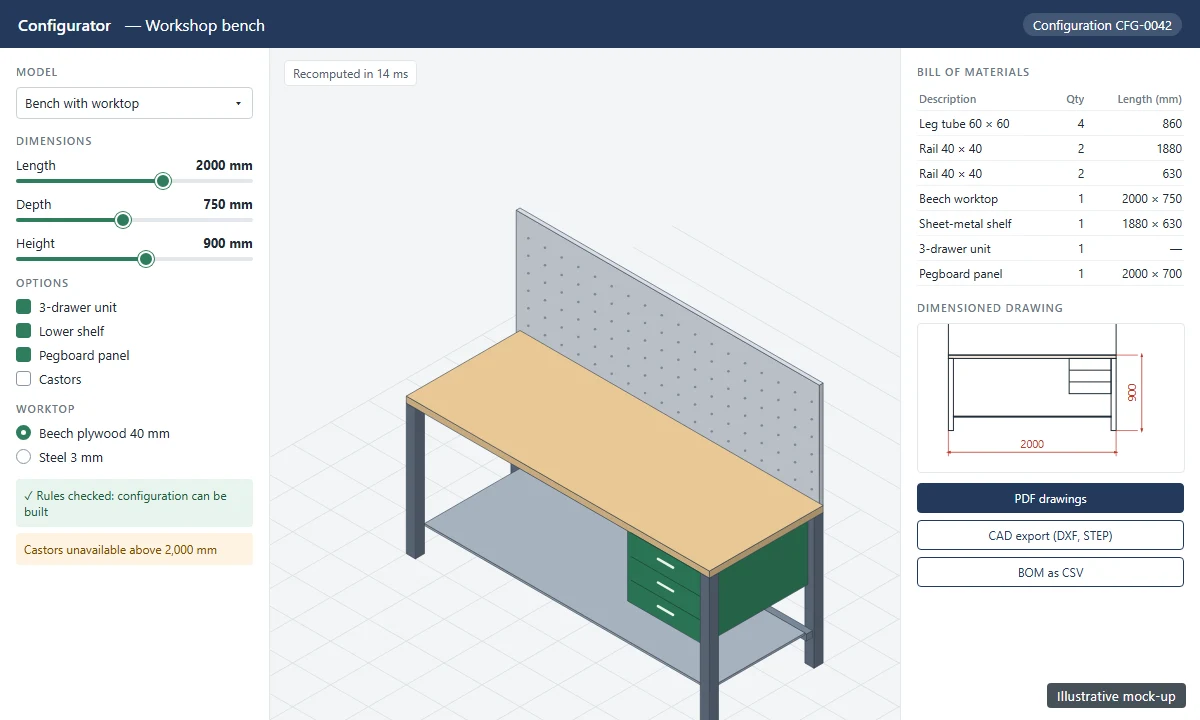
Many online 3D configurators are there to show a product: you change a colour, you spin an image. An engineering configurator goes further, because it works on your design data:
- it applies your engineering rules: allowed dimensions, incompatible options, components imposed by a load or a height;
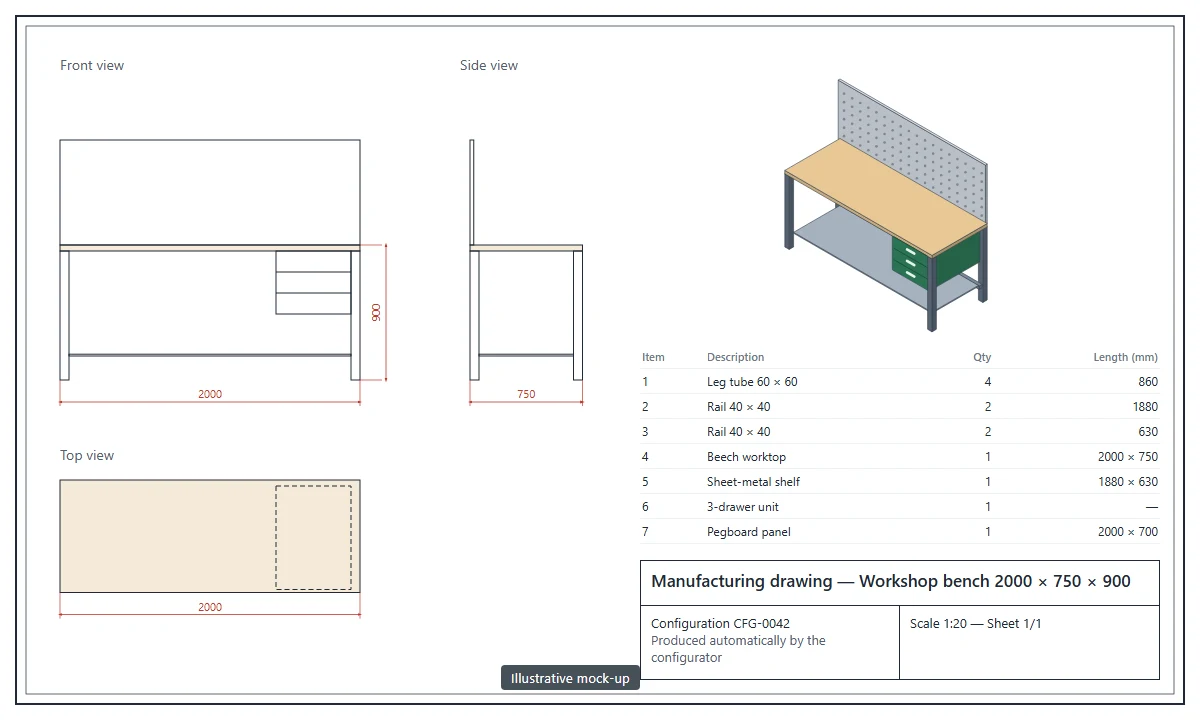
- it produces documents you can use: 3D model, dimensioned drawings, bill of materials, parts list, cut sheets, quote;
- it fits into your process: export to your CAD software, bill of materials sent to the ERP, data reused by your website or catalogue.
The visible part — the screens where choices are made — matters less than the rules it applies and the documents it produces. That is the difference between a tool that saves engineering time and a tool whose every output has to be reworked.
Real time: an engine of the configurator's own
Whoever configures moves a slider, ticks an option, and expects to see the result straight away: the product in 3D, the bill of materials, the price. That is what lets them try several variants in front of their customer, without waiting.
For that, the configurator carries its own geometry and rules engine. The product model — its parameters, its components, its profiles whose length follows a dimension — is prepared once, then recomputed in the browser or the application at every change, in a fraction of a second. The manufacturing documents come from the same computation: drawings, bill of materials, cut list, export to CAD.
There is another approach: handing each configuration to CAD software hosted in the cloud, which regenerates the model and sends back the result. It has its uses, but every request goes through a queue, and the processing time cannot be predicted. For a configurator, where an answer is expected at every click, I prefer a dedicated engine.
KitchenD and Gabaria, two real-time configurators
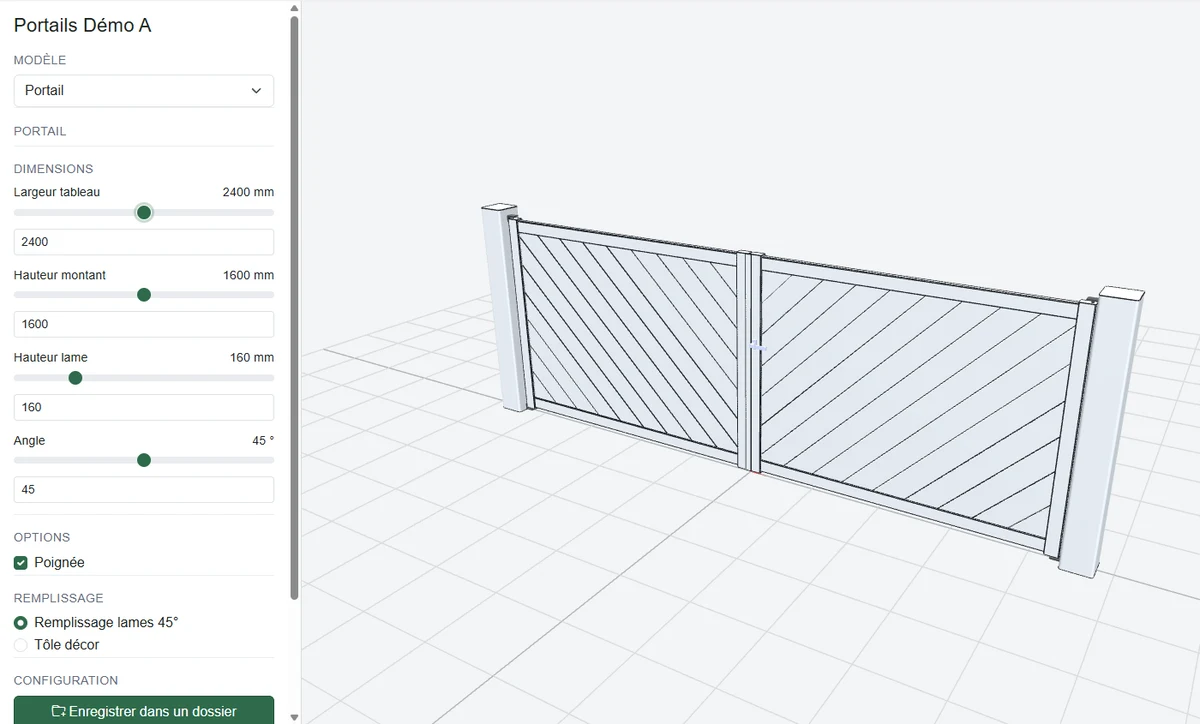
I designed two real-time configurators, which run in the browser with nothing to install.
KitchenD: commercial kitchens
KitchenD is a commercial kitchen configurator, deployed as a white-label product for equipment manufacturers. Sales reps and distributors lay out their customer's kitchen in 3D with the equipment of the manufacturer's catalogue, then:
- get the parts list, the installed power ratings and the bill of materials straight away;
- produce a PDF quote ready to hand over;
- export the layout to pick it up in Revit, in engineering.
The catalogue — the equipment, its 3D models and its options — comes from the manufacturer's Revit families, published to the configurator by a Revit add-in. See also Custom Revit Development.
Gabaria: made-to-measure assembled products
Gabaria is a configurator for made-to-measure assembled products, such as gates and side gates. At every slider move, it regenerates the profiles and the infill of the 3D model, and updates the bill of materials: profiles and their length, slats with their cut lengths, accessories, total length to cut in each profile. The bill of materials exports to CSV; the configuration is saved in the customer's file, from which a priced PDF quote is issued.
Three kinds of configurator
As an online or desktop application
This is the form of KitchenD and Gabaria. The configurator is used by a sales rep, a dealer or the customer, who have no CAD software. It shows the product in 3D, produces the parts list, the quote and the order data, and hands them to engineering with no re-entry.
With drawings produced in your CAD software
The shop drawings must come out of your CAD software, to your drafting standards. I develop the add-in that produces them from the configuration data — for instance in AutoCAD.
On top of an existing configurator
You already have a commercial configurator, but it stops at the quote. I develop the missing link: reading its export files and producing the manufacturing drawings in your CAD software.
Other achievements
Other configurators and configuration tools were developed for manufacturers and software publishers. I keep my clients' names confidential.
Scaffolding
A desktop scaffolding configurator that produces the parts list and the quote. Another project, in AutoCAD, lays out the scaffolding on the drawing according to the trade's rules.
Truck cranes
A truck crane configuration interface, in AutoCAD, that generates the drawing of the configured vehicle.
Outdoor joinery
Drawings of fences, gates and railings are produced in AutoCAD from the XML files of a commercial product configurator. The configurator handles the sale; the add-in produces the shop drawings.
More examples, sorted by software, on the Examples of achievements page.
How a configurator is built
- Rules first — We start from your product ranges, your existing drawings and a few real orders, including the unusual ones. Together we write down the rules: what is allowed, what is forbidden, what follows from what.
- The model and the documents — I describe your products for the configurator's engine and prepare the documents it must produce, then I check on your difficult cases that they come out right.
- The screens — The user's path comes next, suited to whoever configures: designer, sales rep or customer.
- Fixed-price quote, in phases — A first scope, often one product range, then the extension to the others. Each phase is ordered separately, based on the result of the previous one.
The full course of a project is described on the Custom CAD & BIM automation software development page.
Autodesk Authorized Developer

WIIP is a member of the Autodesk Authorized Developer program, which gives early access to pre-release Autodesk software and to the vendor's technical teams. The add-ins that connect your configurator to your CAD software are ready when its next release comes out.
 contact@wiip.fr
 (+33) 6 46 40 75 66
 8 rue du bocage, 62910 SERQUES (France)