Revit families and BIM objects for manufacturers
Your BIM library, produced and kept up to date by software rather than modelled one family at a time. I develop the tools that generate your parametric Revit families from your product data, check every batch, and export it to your catalogue and to the BIM platforms where specifiers look for it — then regenerate it whenever your range changes.
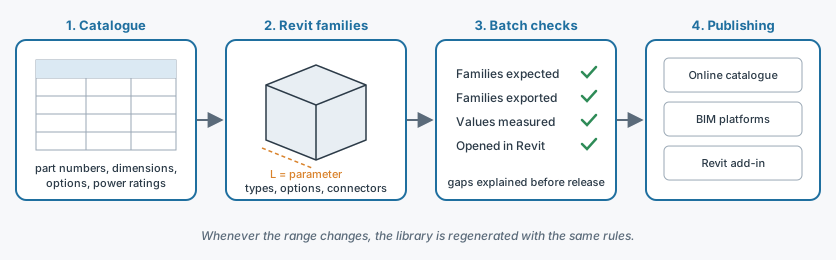
Modelling families is not the hard part
There is no shortage of studios that will model a Revit family for you. The trouble starts afterwards:
- a range is hundreds of products, each available in several sizes, options and variants;
- every family carries technical data — power ratings, flow rates, connections, weights, part numbers — that must match your catalogue exactly;
- the catalogue keeps changing: a product is revised, an option is discontinued, a new series is launched, and the whole library has to follow;
- the same content goes to several places: your website, your configurator, the BIM object platforms, each with its own format and requirements.
A library modelled by hand starts going out of date on the day it is delivered, and every update costs as much as the first time. A library produced by a tool is regenerated in one run, with the same rules.
What I deliver
Automated Revit family creation
A Revit add-in that builds your families in batches from your own data tables: geometry at the right level of detail, types and parameters named to your conventions, mutually exclusive options driven by parameters instead of duplicated into separate families, electrical, plumbing and gas connectors placed where installers expect them.
Checks on every batch
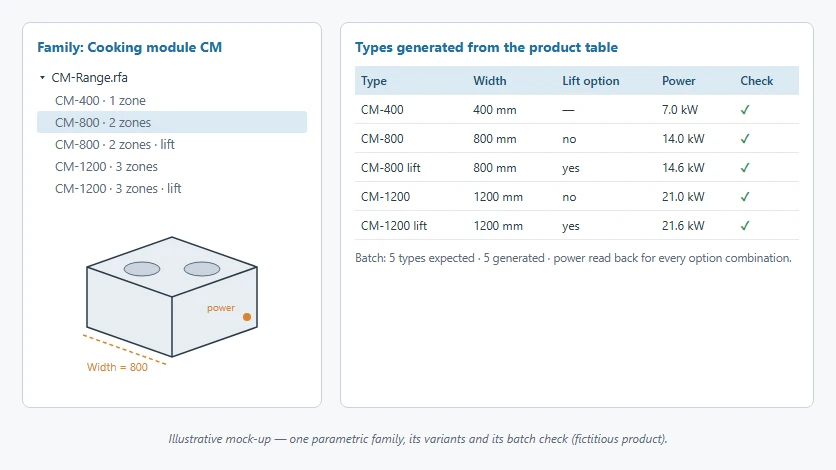
The same tool verifies what it produces: number of families expected versus obtained, technical values read back family by family — including those that depend on combinations of options — and a report of every discrepancy before anything is released.
Export to your catalogue and to BIM platforms
Data and previews of every family are extracted in a usable form — data files, images, import packages — to feed your online catalogue, your configurator or the BIM content platforms.
Library maintenance
A new series, a new Revit release, a data correction: the library is regenerated with the same rules, and each batch is checked again before publication. Updates become a routine run, not a new modelling project.
A branded add-in for your specifiers
If you want to go beyond downloads: a Revit add-in under your brand that places your families in the model, guides the choice of model and options, and keeps the user's library up to date.
How a project runs
- Scoping — We start from your catalogue and a few representative products, including the hardest ones (many options, values that depend on each other). Together we fix the parameters, naming rules and target platforms.
- Prototype — I deliver these first families and the first version of the tool. You test them in Revit, on your own projects.
- Production — The range is processed in batches, each one checked: families expected and obtained, technical values, opening in Revit.
- Release and maintenance — I deliver the import packages and the tool's documentation. Later updates go through the same process.
You deal directly with the developer from start to finish, with no intermediary between your needs and the code. The general course of a project is described on the Custom CAD & BIM automation software development page.
Projects
The following projects were carried out for a publisher of commercial kitchen design software, on behalf of the manufacturers whose ranges it distributes, and for other manufacturers; their names are withheld for confidentiality.
Commercial kitchen equipment libraries
A publisher of commercial kitchen design software offers, in its online planner, the Revit families of several equipment manufacturers (ranges, fryers, cooking modules). I developed the pipeline between the two: each manufacturer's families are exported in batches, with a profile specific to each brand, to the planner's catalogue.
- Several hundred families per manufacturer, processed in batches of about two hundred;
- power ratings measured family by family, including when they depend on mutually exclusive options (a model with or without a lifting device, for instance): every combination is measured so that the catalogue shows the right value;
- a check on every batch: any gap between the number of families expected and exported is explained before release, and values are verified in Revit;
- a new series — about twenty families supplied by the manufacturer — follows the same path as the rest of the range: upload, export with the brand's profile, check in Revit, import package ready.
Parametric families
For other manufacturers, I designed parametric families that replace whole series of fixed families: a single object, driven by its parameters, covers the sizes and variants of the range.
Revit background
From 2015 to 2024, I wrote the Revit - Conception de bâtiment handbook for Éditions ENI, which covers in particular the design of complex families. I develop Revit add-ins in C#/.NET with the official API — see also Custom Revit Development.
WIIP is a member of the Autodesk Authorized Developer program, which gives early access to pre-release Autodesk software: your tools are ready when the next Revit release comes out.
Let's talk about your range
You are a manufacturer and want your products in your specifiers' models, and kept current? Send me a few products from your catalogue and the platforms you target: I will reply with a first approach and a free quote.
Contact me · contact@wiip.fr · (+33) 6 46 40 75 66
 contact@wiip.fr
 (+33) 6 46 40 75 66
 8 rue du bocage, 62910 SERQUES (France)